Update piping specification
To be able to use the components you’ve created, they must be included in specification (unless the usage of “Out of Spec” part is allowed).
Procedure to add objects in the specification:
-
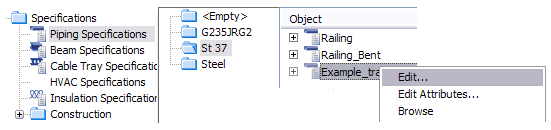
In Project Environment browse item Specifications / Piping Specifications.
-
Right-click an existing spec (carbon steel or equivalent) and select command Edit.
-
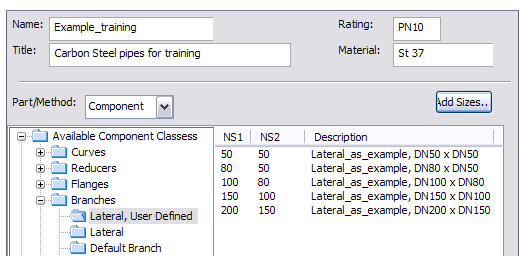
In Edit Specification command browse item Available Component Classes / Branches / Lateral, User Defined (the functional code you created earlier).
-
Click Add Sizes...
-
Select the catalog part “Lateral_as_example” (or the one you’ve created) from the list.
-
Click OK and select all sizes from the list to be added in “Lateral, User Defined” folder.
-
Click Save and click Close.
In the picture below you can see the result of this example. In piping specification “Example_training” you have added the laterals in the corresponding folder “Laterals, User Defined” which you defined earlier in Component Class “Branches”. All the sizes you created in dimension table (via the catalog part) are available in the spec.